英文原文:SAP-samples · 上游版本 d43eb13c4c7c · 原始 Markdown
Released ABAP Classes
- Released ABAP Classes
- Excursions
- Running a Class and Displaying Output in the ADT Console
- Creating and Transforming UUIDs
- XCO Representations of SY Components
- RAP
- Transactional Consistency
- Numbers and Calculations
- String Processing
- Handling Codepages and Binary Data
- Regular Expressions
- Time and Date
- Calendar-Related Information
- Runtime Type Services (RTTS)
- Assignments
- Information about Non-Initial Structure Components
- Comparing Content of Compatible Internal Tables
- Dynamic Programming
- Getting the Current User Name
- XML/JSON
- ABAP Repository Object Information
- Generating ABAP Repository Objects
- Call Stack
- Sending Emails
- Tenant Information
- Exception Classes
- Parallel Processing
- Application Log
- Running Code in the Background
- Locking
- Calling Services
- Reading and Writing XLSX Content
- Zip Files
- ABAP Unit
- Units of Measurement
- Programmatic ABAP Test Cockpit (ATC) Check
- Handling Number Ranges
- Releasing APIs
- Application Jobs
- Generative AI
- Programmatically Creating and Releasing Transport Requests
- Repairing and Cleaning up HTML and XML Documents
- Creating and Using IDE Actions
- Output Management (PDF Rendering)
- Writing Internal Table Content to CSV
- Triggering Garbage Collection
- Message Utility Class
- SAP Codes Conversion
This ABAP cheat sheet contains a selection of released ABAP classes that are available in ABAP for Cloud Development. It serves as a quick introduction, along with code snippets to explore the functionality in action.
[!NOTE]
- The cheat sheet is not a comprehensive overview, and the code snippets do not claim to be comprehensive as far as options, methods, or parameters are concerned. It is intended to give you a rough overview, for you to get an idea. It is an invitation to a more in-depth exploration.
- For more information and where available, refer to the class documentation (for example, choose F2 when the cursor is on the class name in ADT), the ABAP Keyword Documentation, and the SAP Help Portal documentation.
- You might find that different classes can achieve similar or the same results, especially with the Extension Components Library (XCO), a general-purpose development library designed specifically for ABAP for Cloud Development. Choose the classes that best meet your needs.
- For XCO classes, the cheat sheet covers released XCO APIs. In Standard ABAP, XCO APIs are also available (often, they do not have
CPin the class name). These classes are not covered here.- Disclaimer
Excursions
Classes Available in ABAP for Cloud Development
If available to you, you have accessed an SAP Business AI Platform, ABAP environment using the ABAP development tools for Eclipse (ADT). Access to SAP-provided repository objects is restricted to objects that have been released for ABAP for Cloud Development (released APIs). You can find the released repository objects in the Project Explorer view in ADT under Released Objects. The classes are located in the Source Code Library folder:
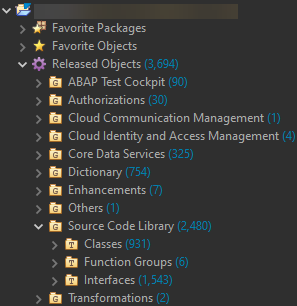
You can also programmatically get the released objects. You can use specific XCO classes or a CDS view, as shown in the example code snippet below.
SELECT ReleasedObjectType, ReleasedObjectName, ReleaseState
  FROM i_apisforclouddevelopment
  WHERE releasestate = 'RELEASED'
  AND ReleasedObjectType = 'CLAS'
  ORDER BY ReleasedObjectName
  INTO TABLE @DATA(released_classes).
[!TIP] Find more resources on information retrieval for released APIs in the Finding Released APIs section of the ABAP for Cloud Development cheat sheet.
Cloud Development Successors
The I_APIsWithCloudDevSuccessor view provides information on objects that cannot or should no longer be used in ABAP for Cloud Development along with their successors that can be used.
SELECT * FROM I_APIsWithCloudDevSuccessor
 INTO TABLE @DATA(successors_all).

SELECT * FROM I_APIsWithCloudDevSuccessor
 WHERE PredecessorObjectType = 'TABL'
 INTO TABLE @DATA(successors_tables).

SELECT SINGLE * FROM I_APIsWithCloudDevSuccessor
 WHERE PredecessorObjectName = 'TADIR'
 INTO @DATA(successor_tadir).
Running a Class and Displaying Output in the ADT Console
The table includes the IF_OO_ADT_CLASSRUN interface.
| Interface/Class | Details/Code Snippet |
IF_OO_ADT_CLASSRUN |
|
CL_DEMO_CLASSRUN |
As an alternative to using the IF_OO_ADT_CLASSRUN interface for displaying output in the console, you can also use the CL_DEMO_CLASSRUN class, which offers more methods.
For more information, refer to this blog.
The following example makes use of the CL_DEMO_CLASSRUN class. A structure and an internal table are displayed in the console. A structure component is a reference variable, which is automatically dereferenced. Plus, the write_xml method is shown, which displays XML data.
|
CL_XCO_CP_ADT_SIMPLE_CLASSRUN |
XCO alternative for output in the ADT console |
[!TIP]
- The
CL_DEMO_OUTPUT_CLOUDclass is available for demo purposes only. It wraps the output functionalities of theCL_DEMO_OUTPUTclass that is available in Standard ABAP and used for demo display purposes, especially useful for displaying internal table content.- As an excursion, find examples using the class in Creating and Using IDE Actions.
- Find more information in this blog.
Creating and Transforming UUIDs
| Class | Details/Code Snippet |
CL_SYSTEM_UUID |
Creating and converting system UUIDs with various algorithms
|
XCO_CP XCO_CP_UUID |
Creating UUIDs and transforming between different UUID formats using XCO
|
XCO Representations of SY Components
| Class | Details/Code Snippet |
XCO_CP |
|
RAP
| Class | Details/Code Snippet |
CL_ABAP_BEHV_AUX |
A utility class for retrieving information about RAP handler implementations, such as the current context of RAP handler/saver methods, the handler kind, and the current RAP transactional phase (e.g., RAP interaction phase.
|
CL_ABAP_BEHAVIOR_HANDLER |
Used for RAP handler classes that inherit from class CL_ABAP_BEHAVIOR_HANDLER.
|
CL_ABAP_BEHAVIOR_SAVER |
Used as base class from which a RAP saver class in an ABAP behavior pool (ABP) inherits. The RAP saver class must be defined in the CCIMP include of an ABP.
|
CL_ABAP_BEHAVIOR_SAVER_FAILED |
|
CL_ABAP_BEHAVIOR_EVENT_HANDLER |
It is used as base class from which a RAP event handler class in its CCIMP include inherits. Its purpose is to locally consume RAP business events.
More information: ABAP for RAP Business Events.
|
Transactional Consistency
| Class | Details/Code Snippet |
CL_ABAP_TX |
|
Numbers and Calculations
| Class | Details/Code Snippet |
CL_ABAP_MATH |
For operations with (decimal) floating point numbers and for providing constants for minimum and maximum values.
|
CL_ABAP_DECFLOAT |
For handling decimal floating point numbers.
|
CL_ABAP_BIGINT |
For calculations with integers of any size (e.g. to avoid the risk of an arithmetic overflow). Find more information in
this blog, and check out the different methods available.
|
CL_ABAP_RATIONAL |
For calculations with rational numbers without precision loss and rounding errors.
|
CL_ABAP_RANDOM* |
For generating arbitrary numbers for different numeric types:
CL_ABAP_RANDOM_INT (type i),
CL_ABAP_RANDOM_INT8 (int8),
CL_ABAP_RANDOM_FLOAT (f),
CL_ABAP_RANDOM_PACKED (p),
CL_ABAP_RANDOM_PACKED_DEC1 - CL_ABAP_RANDOM_PACKED_DEC14 (p with 1 to 14 decimal places),
CL_ABAP_RANDOM_DECFLOAT16 (decfloat16),
CL_ABAP_RANDOM_DECFLOAT34 (decfloat34)
The following example explores the generation of arbitrary numeric values.
|
CL_ABAP_PROB_DISTRIBUTIONCL_ABAP_PROB_DISTRIBUTION_DF34 |
|
String Processing
| Class | Details/Code Snippet |
CL_ABAP_CHAR_UTILITIES |
Provides utilities for string processing, such as attributes that represent new lines and horizontal tabs.
|
CL_ABAP_STRING_UTILITIES |
For processing text strings, such as handling trailing blanks in character strings (i.e. data objects of type string).
|
XCO_CP |
Offers various options to process strings using the XCO Library; see a selection in the code snippet
|
Handling Codepages and Binary Data
| Class | Details/Code Snippet |
CL_ABAP_GZIP* |
(De)compressing character strings and byte strings using GZIP:
CL_ABAP_GZIP,
CL_ABAP_GZIP_BINARY_STREAM,
CL_ABAP_GZIP_TEXT_STREAM,
CL_ABAP_UNGZIP_BINARY_STREAM,
CL_ABAP_UNGZIP_TEXT_STREAM
|
CL_ABAP_CONV_CODEPAGE |
For handling code pages, converting strings to the binary representation of different code pages and vice versa.
|
XCO_CP (String conversion) |
Converting strings to xstrings using a codepage using the XCO Library
|
XCO_CP (Base64 decoding/encoding) |
Base64 decoding/encoding using XCO
|
CL_WEB_HTTP_UTILITY |
Endcoding strings/xstrings in Base64 and decoding Base64-encoded strings/xstrings
|
Regular Expressions
| Class | Details/Code Snippet |
CL_ABAP_REGEX CL_ABAP_MATCHER |
|
Time and Date
[!NOTE] In ABAP for Cloud Development, do not use the date and time-related system fields such as
sy-datumandsy-uzeit, and others. User-related time and date values can be retrieved using the XCO library. For code snippets, see the Date, Time, and Time Stamp cheat sheet.
| Class | Details/Code Snippet |
CL_ABAP_CONTEXT_INFO |
Provides context information relevant to the current ABAP session.
|
CL_ABAP_DATFM |
For conversions between the external and the internal representation of a date specification
|
CL_ABAP_TIMEFM |
For conversions between the external and the internal representation of a time specification
|
CL_ABAP_UTCLONG |
For handling time stamps in time stamp fields (data objects with type utclong).
|
CL_ABAP_TSTMP |
For calculating and converting time stamps in packed numbers (types timestamp and timestampl)
|
XCO_CP_TIMEXCO_CP |
Class of the XCO time library that provides abstractions for getting and working with date and time information. Find more details here.
|
Calendar-Related Information
| Class | Details/Code Snippet |
CL_FHC_CALENDAR_RUNTIME |
The following example explores accessing calendar-related information (factory and holiday calendars). Find more information in the SAP Help Portal documentation. Note the released CDS views in that context. |
CL_SCAL_UTILS |
Calendar utilities for getting month names, year and week of a date, first day of a week, name and number of the weekday for a specified date
|
Runtime Type Services (RTTS)
| Class | Details/Code Snippet |
CL_ABAP_TYPEDESCR |
RTTS represent a hierarchy of type description classes containing methods for:
Apart from
CL_ABAP_TYPEDESCR
  |
  |--CL_ABAP_DATADESCR
  |   |
  |   |--CL_ABAP_ELEMDESCR
  |   |   |
  |   |   |--CL_ABAP_ENUMDESCR
  |   |
  |   |--CL_ABAP_REFDESCR
  |   |--CL_ABAP_COMPLEXDESCR
  |       |
  |       |--CL_ABAP_STRUCTDESCR
  |       |--CL_ABAP_TABLEDESCR
  |
  |--CL_ABAP_OBJECTDESCR
     |
     |--CL_ABAP_CLASSDESCR
     |--CL_ABAP_INTFDESCR
|
Assignments
| Class | Details/Code Snippet |
CL_ABAP_CORRESPONDING |
For assignments of components between structures or between internal tables with dynamically specified mapping rules. For more information, you can refer to the ABAP Keyword Documentation.
The example shows simple assignments with structures.
|
Information about Non-Initial Structure Components
| Class | Details/Code Snippet |
CL_ABAP_STRUCT_UTILITIES |
Provides methods to get information about filled components in structures allowing an efficient processing of non-initial components of a structure.
|
Comparing Content of Compatible Internal Tables
| Class | Details/Code Snippet |
CL_ABAP_DIFF |
Using the methods diff and diff_with_line_ref of the CL_ABAP_DIFF class, you can compare the content of two compatible index tables. The returning parameter is an internal table showing how the content of one internal table can be modified to match another one. diff_with_line_ref also returns a reference to the original table lines. Various importing parameters are available to adjust the comparison. Find more information in the class documentation and in the ABAP Keyword Documentation.
|
Dynamic Programming
| Class | Details/Code Snippet |
CL_ABAP_DYN_PRG |
For validating input for dynamic specifications.
|
Getting the Current User Name
| Class | Details/Code Snippet |
CL_ABAP_CONTEXT_INFO |
Provides context information relevant to the current ABAP session.
|
XCO_CP |
|
XML/JSON
| Class | Details |
CL_IXML_* CL_SXML_* |
|
XCO_CP_JSON |
Handling JSON data using the XCO library
|
/UI2/CL_JSON |
|
ABAP Repository Object Information
[!IMPORTANT]
- Note that the XCO CP Edition (many of the released XCO APIs often include CP in the class name) features released classes specifically designed for cloud usage, particularly in the SAP Business AI Platform, ABAP environment.
- While these classes can theoretically be used in other system environments, there is no guarantee of API functionality. This is especially true for the classes in this section that provide information about repository objects. Only SAP- and customer-released repository objects are supported. Find more information here.
- The following two example snippets use the XCO APIs
xco_cp_abap_repositoryandxco_abap_repository(without CP, applicable in Standard ABAP). The assumption is that you have access to a system that supports classic ABAP, thexco_abap_repositoryAPI is available, and you have imported the ABAP cheat sheet repository (or you might use another custom database table). You can use the following to visualize the aforementioned disclaimer. In a class flagged for ABAP for Cloud Development (or Standard ABAP), the snippet withxco_cp_abap_repositoryis usable, in principle. However, you may find that it does not verify the existence of the demo database table (as the table is not released). If you have imported the ABAP cheat sheet repository into an SAP Business AI Platform, ABAP environment, the snippet will return true there.Using"xco_cp_abap_repository DATA(tabl) = xco_cp_abap_repository=>object->tabl->database_table->for( 'ZDEMO_ABAP_CARR' ). DATA(tabl_exists) = tabl->exists( ).xco_abap_repositoryin a class flagged for use with Standard ABAP, the snippet returns true."xco_abap_repository DATA(tabl_2) = xco_abap_repository=>object->tabl->database_table->for( 'ZDEMO_ABAP_CARR' ). DATA(tabl_2_exists) = tabl_2->exists( ).
| Class | Details/Code Snippet |
XCO_CP_ABAPXCO_CP_ABAP_REPOSITORYXCO_CP_ABAP_DICTIONARY |
|
Generating ABAP Repository Objects
| Class | Details/Code Snippet |
XCO_CP_GENERATION |
For creating, updating and deleting ABAP repository objects. More information: Generation APIs The rudimentary snippet is taken from the executable example of the ABAP for Cloud Development cheat sheet. |
Call Stack
| Class | Details/Code Snippet |
XCO_CPXCO_CP_CALL_STACK |
Getting the current ABAP call stack programmatically. See more information here.
|
Sending Emails
| Class | Details/Code Snippet |
CL_BCS_MAIL_MESSAGE |
The following snippet includes some file attachments: |
Tenant Information
| Class | Details/Code Snippet |
XCO_CPXCO_CP_TENANT |
For obtaining various information about the currently active tenant.
|
Exception Classes
| Class | Details/Code Snippet |
CX_* |
Exception classes are special classes, usually starting with the name |
Parallel Processing
| Class | Details/Code Snippet |
CL_ABAP_PARALLEL |
For performing the parallel processing for instances of ABAP Objects. For more information, refer to the class documentation.
The following example class demonstrates parallel processing using the 🟢 Click to expand for more information and example codeNotes on the example:
|
Application Log
| Class | Details/Code Snippet |
CL_BALI_LOG |
For creating and reading application logs. Refer to this documentation for more information and code snippets.
|
XCO_CP_BAL |
The XCO module XCO_CP_BAL is available to deal with the business application log. For more information, see here.
|
Running Code in the Background
| Class | Details/Code Snippet |
CL_BGMC_PROCESS_FACTORY |
Example 1: Using bgPF without transactional control 🟢 Click to expand for example code (Example 1)The following, self-contained, and oversimplified example is intended to give a rough idea about the functionality. It does not include transactional control. The example class can be run using F9 in ADT. It does the following: A demo database table of the cheat sheet repository is filled synchronously and asynchronously (using bgPF) with entries, just to show an effect and get an idea. Two entries are created in the background. WAIT statements are included to have a self-contained example, and that all created database entries can be shown in the output. In the example, the background processing may be visualized, for example, by the MODIFY statement that is followed by a WAIT statement in the loop. The output can show that the entry for the first asynchronously created entry was added before a synchronously created entry. For more visualization options regarding the execution in the background, you can, for example, check the ABAP Cross Trace. For more information, refer to the documentation.
Example 2: Using bgPF with transactional control 🟢 Click to expand for example code (Example 2)This example is similar to example 1. Unlike example 1, example 2 executes operations under transactional control. The transactional phase is explicitly switched using the |
Locking
| Class | Details/Code Snippet |
CL_ABAP_LOCK_OBJECT_FACTORY |
For activating lock objects. Note that you can also use the DEQUEUE_ALL method to remove all locks in the current SAP LUW.
The following example code snippet uses artifacts from the ABAP cheat sheet repository.
|
Calling Services
| Class | Details/Code Snippet |
CL_WEB_HTTP_CLIENT_MANAGERCL_HTTP_DESTINATION_PROVIDER |
To check out examples in demo classes, expand the collapsible sections below. 🟢 1. Read example: Retrieving ABAP cheat sheet markdown content using a GitHub API and sending a ZIP file with the content via email
🟢 2. Post example: Demonstrating a post request by converting Markdown to HTML using the GitHub API
|
Reading and Writing XLSX Content
| Class | Details/Code Snippet |
XCO_CP_XLSX |
The XCO library offers classes such as Expand the following collapsible sections for further information and example code. 🟢 Click to expand for more information and example codeThe following example demonstrates a selection of methods and includes the following steps:
Prerequisite Steps for the XLSX Content Import into the SAP Business AI Platform, ABAP environment The XLSX XCO module works with XLSX content in the form of an xstring. The following example assumes that you have XLSX content available as xstring. To try out the example, you can proceed as follows:
Exploring the XCO XLSX Module Assuming you have the XLSX content created and uploaded above on your system, you can explore the following example using the XCO classes/methods. To try it out, create a demo class named
|
Zip Files
| Class | Details/Code Snippet |
CL_ABAP_ZIP |
The following example creates a zip file and adds three txt files with sample content. Note that the example snippet for |
ABAP Unit
| Class | Details/Code Snippet |
CL_ABAP_UNIT_ASSERT |
Provides methods to verify test expectations in ABAP Unit tests. For more information, see the ABAP Unit Tests cheat sheet. |
CL_ABAP_TESTDOUBLECL_OSQL_TEST_ENVIRONMENTCL_CDS_TEST_ENVIRONMENTCL_BOTD_TXBUFDBL_BO_TEST_ENVCL_BOTD_MOCKEMLAPI_BO_TEST_ENV |
|
Units of Measurement
| Class | Details/Code Snippet |
CL_UOM_DIM_MAINTENANCE |
|
CL_UOM_MAINTENANCE |
|
CL_UOM_CONVERSION |
|
Programmatic ABAP Test Cockpit (ATC) Check
| Class | Details/Code Snippet |
CL_SATC_API |
|
Handling Number Ranges
| Class | Details/Code Snippet |
CL_NUMBERRANGE_OBJECTSCL_NUMBERRANGE_INTERVALSCL_NUMBERRANGE_RUNTIME |
|
Releasing APIs
| Class | Details/Code Snippet |
CL_ABAP_API_STATE |
|
Application Jobs
| Class | Details/Code Snippet |
CL_APJ_DT_CREATE_CONTENTCL_APJ_RT_API |
🟢 Click to expand for more information and example codeNotes on the example:
The example does not cover several aspects (check the documentation for more information), including:
Before running the example class, check the values of the constants in the public section of the class. In particular, ensure you have valid values for these constants:
|
Generative AI
| Class | Details/Code Snippet |
CL_AIC_ISLM_COMPL_API_FACTORYCL_AIC_ISLM_PROMPT_TPL_FACTORY |
|
Programmatically Creating and Releasing Transport Requests
| Class | Details/Code Snippet |
XCO_CP_CTS |
The following code snippet uses the
🟢 Click to expand for example code |
Repairing and Cleaning up HTML and XML Documents
| Class | Details/Code Snippet |
CL_HTMLTIDY |
🟢 Click to expand for example codeThe following example explores some of the capabilities of the
To try the example out, create a demo class named |
Creating and Using IDE Actions
- Miscellaneous interfaces such as
IF_AIA_ACTIONand classes (which are not detailed out here, and some of which are used by the demo examples) are usable in the context of IDE actions. - IDE actions let you create simple features to extend ABAP development tools for Eclipse (ADT).
- With IDE actions, you can build custom functionalities using ABAP, especially for AI-related use cases.
[!NOTE]
- Find more information on IDE actions and examples:
- Your user must be assigned to the
SAP_A4C_BC_DEV_AIA_PCbusiness catalog.
[!IMPORTANT]
- The examples are simplified and only intended for exploration, experimentation, and demonstration, to get a high-level idea. They do not represent best practices or role model approaches for IDE action implementation.
- The examples use
CL_DEMO_OUTPUT_CLOUDto retrieve HTML output of data objects. Note that this class is intended for demo purposes only. The examples use the class's HTML capabilities for display. When you execute the example IDE actions, they present data objects in HTML within the IDE action result dialog. You may recognize this HTML presentation from theCL_DEMO_OUTPUTclass that is available in Standard ABAP and used for demo display purposes, especially useful for displaying internal table content.- The use of IDE actions is your responsibility. Development and use are up to you. Refer to this repository's disclaimer and the disclaimer in the IDE action documentation.
- Be particularly mindful of the potential security risks when importing external content, which the simplified example code below does not address. The example code also uses dynamic programming techniques. They can pose a security risk. Refer to the Dynamic Programming cheat sheet and the ABAP Keyword Documentation.
The (non-AI-related) experiments include these IDE actions for demo purposes:
| IDE Action | Notes |
|---|---|
|
File uploader and downloader |
|
|
Class runner and data object displayer |
|
|
Method runner and parameter displayer |
|
|
XLSX file importer and content displayer |
|
The class setup is similar across all examples:
- Creation of repository objects for demo IDE actions.
- Each demo IDE action involves two global classes:
- Implementing class
- Input UI configuration class (some of which include implementation in the CCIMP include/Local types tab in ADT)
- A demo class to demonstrate the IDE action (except for the XLSX file importer and content displayer example; the examples use a demo class named
ZCL_DEMO_ABAP) - Some IDE action classes contain code within the CCIMP include.
- Some examples require the creation of a demo interface.
Expand the following collapsible sections for descriptions and example code:
🟢 1) File uploader and downloader
Demo Purpose
This demo IDE action lets you upload and process files, as well as download them. It showcases the upload and processing of JSON and XLSX files, along with download and display options for XML, JSON, TXT, and HTML content.
Setup Steps
-
Create IDE action
- Access your demo package in ADT in your SAP Business AI Platform, ABAP environment.
- Create a new repository object e.g. by right-clicking the package and choosing New -> Other ABAP Repository Object -> Filter for IDE Action.
- Action creation:
- Name: ZDEMO_ABAP_FILE_IMPORT_EXPORT
- Description: File importer and exporter
- Make the following entries on the IDE action screen:
- Title: Demo IDE Action: Import/Export
- Summary: Action to upload and download files
- Implementing Class:
ZCL_DEMO_ABAP_IDE_IMP_EXP_IMPL - Input UI Configuration Class:
ZCL_DEMO_ABAP_IDE_IMP_EXP_UI - Number of Focused Resources: Any
- Filter Object Types:
CLAS(choose Add and filter forCLAS)
-
Create the IDE action classes (implementing and input UI configuration class)
- Choose the Implementing Class link. A pop-up is displayed to start the class creation. Provide a description and walk through the wizard. Once the class has been created, activate the class having no implementation at this stage.
- Go back and repeat the steps for the Input UI Configuration Class.
- Once the classes have been created, activate the IDE action. The screen will show warnings regarding interfaces not implemented in the classes.
- For demo purposes, you can copy and paste the code from below. Note that the
ZCL_DEMO_ABAP_IDE_IMP_EXP_UIclass also requires code in the CCIMP include/Local Types tab in ADT.
-
Create interface
- Create an interface named
ZIF_DEMO_ABAP_IDE_IMP_EXPand use the code below. ImplementingZIF_DEMO_ABAP_IDE_IMP_EXPis essential for checking out the IDE action. - This interface defines the methods
process_importandexport, which include custom logic to process content for upload and download. For example, the example demonstrates uploading an XLSX file. Theprocess_importmethod implementation in theZCL_DEMO_ABAPclass is specifically tailored for this example, allowing XLSX content to be uploaded and processed using the XLSX XCO API. Theexportmethod is designed to provide content for download based on the selected operation in the IDE action dialog.
- Create an interface named
-
Create a class that implements the demo logic for uploading, downloading, and processing file content
- To try the example out, create a demo class named
zcl_demo_abap. If it already exists, reuse it. Otherwise, create a new class with a different name. Paste the code into it. If you choose a different class name, update the class name in the code snippet accordingly. - Note: The examples use a demo database table from the ABAP cheat sheet repository. If you have not imported the repository, create the
ZDEMO_ABAP_CARRdatabase table by reusing the code from the repository (see below). You can run this class using F9 in ADT to initialize the demo database table and add entries for testing. Refer to the comments in the class code, as you need to comment out a section of the code beforehand.@EndUserText.label : 'Demo table: Airline' @AbapCatalog.enhancement.category : #NOT_EXTENSIBLE @AbapCatalog.tableCategory : #TRANSPARENT @AbapCatalog.deliveryClass : #A @AbapCatalog.dataMaintenance : #RESTRICTED define table zdemo_abap_carr { key mandt : abap.clnt not null; key carrid : abap.char(3) not null; carrname : abap.char(20) not null; currcode : abap.cuky not null; url : abap.char(255) not null; }
- To try the example out, create a demo class named
-
Perform a mass activation to activate all artifacts.
-
The demo includes uploading JSON and XLSX files. Ensure you have the necessary files and content to execute the demo according to the implementations in the
zif_demo_abap_ide_imp_exp~process_importmethod of theZCL_DEMO_ABAPclass:-
Create a JSON file on your local machine, e.g.
carriers.json, and insert the following content:[ { "MANDT": "000", "CARRID": "ZZ", "CARRNAME": "ZZ Airlines", "CURRCODE": "USD", "URL": "some_url_zz_airlines" }, { "MANDT": "000", "CARRID": "YY", "CARRNAME": "YY Airways", "CURRCODE": "EUR", "URL": "some_url_yy_airways" }, { "MANDT": "000", "CARRID": "XX", "CARRNAME": "Air XX", "CURRCODE": "JPY", "URL": "some_url_air_xx" } ] -
Create an XLSX file on your local machine, e.g.
carriers.xlsx, and insert the following content:100 AB AB Airlines EUR some_url_ab_airlines 100 CD CD Airways USD some_url_cd_airways 100 EF Air EF JPY some_url_air_ef
-
Demo Execution Steps
- In ADT, you have opened any class.
- Choose STR + ALT/CMD + R to run an IDE action.
- Select the IDE action Demo IDE Action: Import/Export. You can filter for Export.
- Choose Run (or double-click the IDE action).
- An IDE action dialog is displayed prompting you to provide a class. Insert the demo class
ZCL_DEMO_ABAP(or browse). The demo expects a class to be specified that implements theZIF_DEMO_ABAP_IDE_IMP_EXPinterface. - Checking out the demo upload functionality:
- Select Upload from the Operation dropdown list.
- In the File Import from Path input field, select a file from your local machine. You can browse for it.
- Example 1 (JSON content upload):
- It is assumed that you have created a JSON file (e.g.,
carriers.json) as described above. - Ensure you comment in the code for processing the JSON content in the
zif_demo_abap_ide_imp_exp~process_importmethod of theZCL_DEMO_ABAPclass. Also, comment out the code for XLSX content processing. - Choose Run. The demo implementation includes deserializing the imported JSON content. The processing is demonstrated by adding the contained datasets to the demo database table. An IDE action popup will display a message based on the
messageparameter.
- It is assumed that you have created a JSON file (e.g.,
- Example 2 (XLSX content upload):
- Similar to example 1, it is assumed that you have created an XLSX file (e.g.,
carriers.xlsx) as described above. - Ensure you comment in the code for processing the XLSX content in the
zif_demo_abap_ide_imp_exp~process_importmethod of theZCL_DEMO_ABAPclass. Also, comment out the code for JSON content processing. - Choose Run. The demo implementation processes the XLSX content using the XLSX XCO API. Similar to the JSON example, a demo database table is updated based on the XLSX file content, and an IDE action popup will display a message.
- Similar to example 1, it is assumed that you have created an XLSX file (e.g.,
- Checking out the demo display and download functionality:
- The demo includes the display and download of XML, JSON, TXT and HTML content. The Operation dropdown list includes the respective selection options.
- When you select a specific download option, the
zif_demo_abap_ide_imp_exp~exportmethod of theZCL_DEMO_ABAPclass is called. Depending on the selection, demo code is executed. This is realized by an enumerated type, defined in the interface. An importing parameter is typed with this enumerated type. Its value determines what code is executed, realized by aCASEstatement.- XML (asXML): Database table entries are retrieved using a
SELECTstatement. Using aCALL TRANSFORMATIONstatement, the internal table content is transformed (to asXML) and returned. - JSON: Database table entries are retrieved using a
SELECTstatement. Using the/UI2/CL_JSONclass, the internal table content is converted to JSON and returned. - TXT: A simple string, representing the content of a TXT file, is returned.
- HTML: Database table entries are retrieved using a
SELECTstatement. Using theCL_DEMO_OUTPUT_CLOUDclass, the internal table content is converted to HTML and returned.
- XML (asXML): Database table entries are retrieved using a
- You can use the Export... button to download the appropriate files. The file extension is predefined; for example, XML downloads use
*.xml.- The IDE action is designed so that the Run functionality cannot be selected for download; it is only available for checking the upload functionality.
- The HTML content is directly displayed in the IDE action dialog. You can download the file by right-clicking the displayed HTML and selecting the option to save it to your local machine.
| Class (include)/Interface | Code |
|---|---|
|
|
|
|
|
|
|
|
|
|
Interface to check out the IDE action |
|
|
Class to check out the IDE action |
|
🟢 2) Class runner and data object displayer
Demo Purpose
This demo IDE action runs classes and displays the content of data objects in an IF_OO_ADT_CLASSRUN-like style. Instead of plain text in the ADT console, it presents the results as HTML in an IDE action result dialog in ADT.
Steps
- Access your demo package in ADT in your SAP Business AI Platform, ABAP environment.
- Create a new repository object e.g. by right-clicking the package and choosing New -> Other ABAP Repository Object -> Filter for IDE Action.
- Action creation:
- Name: ZDEMO_ABAP_IDE_ACTION_OUTPUT
- Description: IDE Action for HTML Output
- Make the following entries on the IDE action screen:
- Title: Demo IDE Action: HTML Output
- Summary: Action to display the content of data objects as HTML in an IDE action result dialog
- Implementing Class:
ZCL_DEMO_ABAP_ACTION_OUTPUT - Input UI Configuration Class:
ZCL_DEMO_ABAP_ACTION_OUTPUT_UI - Number of Focused Resources: Any
- Filter Object Types:
CLAS(choose Add and filter forCLAS)
- Create the classes
- Click the Implementing Class link. A pop-up is displayed to start the class creation. Provide a description and walk through the wizard. Once the class has been created, activate the class having no implementation at this stage.
- Go back and repeat the steps for the Input UI Configuration Class.
- Once the classes have been created, activate the IDE action. The screen will show warnings regarding interfaces not implemented in the classes.
- For demo purposes, you can copy and paste the code from below.
- Perform a mass activation to activate the classes because one class uses types specified in the other class.
- To check out the action, proceed as follows:
- Create an interface named
ZIF_DEMO_ABAP_OUTPUTand use the code from below.ZIF_DEMO_ABAP_OUTPUTis essential to be implemented for checking out the IDE action. - To try the example out, create a demo class named
zcl_demo_abap. The code contains a collection of various data objects that should be displayed. - In ADT, you have opened the demo class
ZCL_DEMO_ABAP(or any class implementing the interface). - Choose STR + ALT/CMD + R to run an IDE action.
- Select the IDE action. You can filter for HTML Output.
- Choose Run.
- An IDE action dialog is displayed prompting you to provide a class. Insert the testing class
ZCL_DEMO_ABAP(or browse, or you have run the action in a class filling the input field automatically). - Choose Run.
- The IDE action result dialog is displayed showing the HTML output of the data objects that were written using
out->write( ... ).and other methods that theCL_DEMO_OUTPUT_CLOUDclass offers.. - The example class is designed to demonstrate various data objects, ranging from elementary types to more complex types such as structures and internal tables, including nested structures, deep internal tables, and data references.
- Create an interface named
| Class (include)/Interface | Code |
|---|---|
|
|
|
|
|
|
|
|
|
|
Interface to check out the IDE action |
|
|
Class to check out the IDE action |
|
🟢 3) Method runner and parameter displayer
Demo Purpose
- This demo IDE action lets you select usable and instantiable classes, select one of their public instance or static methods, and provide the input parameters (if any) with character-like actual parameters.
- For example, a calculator method may require three inputs: two numbers and an operator. The example focuses on basic cases and does not perform input validation at runtime.
- When you run the IDE action, the method is executed.
- As a result, the parameter table (refer to the Dynamic Programming cheat sheet) is displayed as HTML in the IDE action result dialog using
CL_DEMO_OUTPUT_CLOUD, including any of the input and output parameters and their values (if any).
Steps
- Access your demo package in ADT in your SAP Business AI Platform, ABAP environment.
- Create a new repository object by, e.g. right-clicking the package and choosing New -> Other ABAP Repository Object -> Filter for IDE Action.
- Action creation:
- Name: ZDEMO_ABAP_IDE_ACTION_M_RUN
- Description: IDE Action for Method Running and Parameter Displaying
- Make the following entries on the IDE Action screen:
- Title: Demo IDE Action: Method Run
- Summary: Action to run public instance and static class methods and display the content of parameters as HTML in an IDE action pop-up
- Implementing Class:
ZCL_DEMO_ABAP_ACTION_METHODRUN - Input UI Configuration Class:
ZCL_DEMO_ABAP_ACTION_M_RUN_UI - Number of Focused Resources: Any
- Filter Object Types:
CLAS
- Create the classes (see the description on the steps in the first expandable section).
- Create a demo class named
ZCL_DEMO_ABAPto check out the IDE action. - For the classes, you can use the code below.
- To check out the demo IDE action, proceed as follows:
- In ADT, you have opened the demo class
ZCL_DEMO_ABAP(or any class implementing the interface). - Choose STR + ALT/CMD + R to run an IDE action.
- Select the IDE action. You can filter for Method Run.
- Choose Run.
- An IDE action dialog is displayed prompting you to provide a class.
- Once you have provided the class name, you can choose Browse for Public Method. Select the method you want to call.
- If the selected method has input parameters, they are displayed in the Method Input Parameters section.
- To provide actual parameters for the formal parameters, select the line and choose Edit. You can then provide input for Value.
- Choose Run.
- The IDE action result dialog is displayed showing the HTML output of the parameter table (if any), i.e. also possible output parameters and their content.
- In ADT, you have opened the demo class
| Class (include) | Code |
|---|---|
|
|
|
|
|
|
|
|
|
|
Class to check out the IDE action |
|
🟢 4) XLSX file importer and content displayer
Demo Purpose
- The demo IDE action lets you select an XLSX file from your local machine, retrieve its content, and display it in an internal table as HTML using
CL_DEMO_OUTPUT_CLOUDin the IDE action result dialog. - In the selection IDE action dialog, you can specify which worksheet contains the content to retrieve. You can also choose where to start retrieving the content (e.g., from column A, row 1) and indicate if there is a header line. If a header exists, the content of that cells in that line are used as field names for the internal table.
- When you run the IDE action, the XCO API is used to read the XLSX content. An internal table is created dynamically, and the worksheet content is added to it. Finally, this internal table is displayed as HTML in the IDE action result dialog.
Steps
- Access your demo package in ADT in your SAP Business AI Platform, ABAP environment.
- Create a new repository object by, e.g. right-clicking the package and choosing New -> Other ABAP Repository Object -> Filter for IDE Action.
- Action creation:
- Name: ZDEMO_ABAP_IDE_ACTION_IMPORT
- Description: IDE Action for XLSX file import
- Make the following entries on the IDE Action screen:
- Title: Demo IDE Action: File Importer
- Summary: Action to import XLSX files and display the content in an internal table in an IDE action pop-up
- Implementing Class:
ZCL_DEMO_ABAP_ACTION_IMPORT - Input UI Configuration Class:
ZCL_DEMO_ABAP_ACTION_IMPORT_UI - Number of Focused Resources: Any
- Filter Object Types:
CLAS(choose Add and filter forCLAS)
- Create the classes (see the description on the steps in the first expandable section).
- You do not need a demo class named
ZCL_DEMO_ABAPto check out the IDE action for this example. - For the classes, you can use the code below. The table below also contains demo content you can provide your demo worksheet with.
- To check out the demo IDE action, proceed as follows:
- In ADT, you have opened a class (no particular class).
- Choose STR + ALT/CMD + R to run an IDE action.
- Select the IDE action. You can filter for File import.
- Choose Run.
- An IDE action dialog is displayed prompting you to provide a path to an XLSX file on your local machine.
- The assumption is that a very simple worksheet is imported, for example, the content is available in the first worksheet and has a header line. The content starts at column A in row 1. If the content does not include a header line, you can select the checkbox. If the content starts elsewhere in the sheet (e.g. at column C, row 3), you can make the appropriate entry.
- The table below includes descriptions for demonstrations.
- Choose Run.
- If the XLSX content processing is successful, the IDE action result dialog will display the XLSX content in an internal table, presented as HTML table.
[!WARNING]
Since the example IDE action lets you import a local file, be mindful of the potential security risks when importing external content. Refer to this repository's disclaimer and to the disclaimer in the documentation about XCO.
| Subject/Class | Notes/Code | ||||||||||||||||||||||||||||||||||||||||||||||||||||||||||||
|---|---|---|---|---|---|---|---|---|---|---|---|---|---|---|---|---|---|---|---|---|---|---|---|---|---|---|---|---|---|---|---|---|---|---|---|---|---|---|---|---|---|---|---|---|---|---|---|---|---|---|---|---|---|---|---|---|---|---|---|---|---|
|
|
|
||||||||||||||||||||||||||||||||||||||||||||||||||||||||||||
|
|
|
||||||||||||||||||||||||||||||||||||||||||||||||||||||||||||
|
Example XLSX content and demo execution steps |
First Example
Second Example
Third Example
|
Output Management (PDF Rendering)
| Classes | Details/Code Snippet |
CL_FP_ADS_UTILCL_RSPO_PDF_MERGER |
These classes are used in the context of output management. In this context, multiple classes and methods are available. The example code snippet illustrates these:
Find more information here. 🟢 Click to expand for more information and example codeNotes on the example:
|
Writing Internal Table Content to CSV
| Class | Details/Code Snippet |
CL_CSV_FACTORY |
|
Triggering Garbage Collection
- The
CL_ABAP_GARBAGE_COLLECTORclass provides thecollectmethod. - Calling this method manually triggers garbage collection, regardless of current memory consumption or the garbage collector's state.
- The ABAP runtime framework periodically invokes the garbage collector, so it is generally unnecessary to trigger clearing explicitly. However, doing so can be beneficial in exceptional cases, such as when large, unnecessary objects consume significant memory or when explicit memory release is needed in resource-constrained environments. It can also help analyze memory usage and ensure proper memory release.
cl_abap_garbage_collector=>collect( ).
Message Utility Class
- The
CL_MESSAGE_HELPERclass offers several helper methods for handling messages. - For more information, refer to the class documentation. The example, which uses artifacts from the ABAP cheat sheet repository, illustrates a selection of methods:
- Getting the most recent T100 exception from an exception object chain
- Setting sy-msg* variables based on exception objects with reference to the types IF_MESSAGE and IF_T100_MESSAGE
- Setting sy-msg* variables based on text
- Returning short text for parameters
🟢 Click to expand for example code
CLASS zcl_demo_abap DEFINITION
  PUBLIC
  FINAL
  CREATE PUBLIC .

  PUBLIC SECTION.
    INTERFACES if_oo_adt_classrun.
  PROTECTED SECTION.
  PRIVATE SECTION.
ENDCLASS.


CLASS zcl_demo_abap IMPLEMENTATION.

  METHOD if_oo_adt_classrun~main.

    DATA error TYPE REF TO cx_root.

*&---------------------------------------------------------------------*
*& get_latest_t100_exception
*& Gets the most recent T100 exception from an exception object chain
*&---------------------------------------------------------------------*

    out->write( |\n---------- get_latest_t100_exception method ----------\n\n| ).

    DO 5 TIMES.
      TRY.
          RAISE EXCEPTION TYPE zcx_demo_abap_error_a
            EXPORTING
              textid   = zcx_demo_abap_error_a=>error_003
              p_003_a  = `Error no.`
              p_003_b  = CONV #( sy-index )
              previous = error.
        CATCH zcx_demo_abap_error_a INTO error.
      ENDTRY.
    ENDDO.

    DATA(t100_exc) = cl_message_helper=>get_latest_t100_exception( error ).

    IF t100_exc IS BOUND.
      DATA(t100key) = t100_exc->t100key.
      out->write( t100key ).
      IF t100_exc->t100key <> if_t100_message=>default_textid.
        DATA(error_text) = t100_exc->if_message~get_text( ).
        out->write( error_text ).
      ENDIF.
    ELSE.
      out->write( `not bound` ).
    ENDIF.

    out->write( |\n{ repeat( val = `-` occ = 50 ) }\n| ).

    DATA prev TYPE REF TO cx_root.
    prev = error->previous.
    WHILE prev IS NOT INITIAL.
      t100_exc = cl_message_helper=>get_latest_t100_exception( prev ).

      IF t100_exc IS BOUND.
        error_text = t100_exc->if_message~get_text( ).

        t100key = t100_exc->t100key.
        out->write( error_text ).
        out->write( t100key ).
      ELSE.
        out->write( `not bound` ).
      ENDIF.
      out->write( |\n{ repeat( val = `-` occ = 15 ) }\n| ).

      prev = prev->previous.

    ENDWHILE.

    out->write( |\n{ repeat( val = `*` occ = 80 ) }\n| ).

*&---------------------------------------------------------------------*
*& set_msg_vars_for_if_msg
*& Sets sy-msg* variables based on reference of type IF_MESSAGE
*&---------------------------------------------------------------------*

    out->write( |\n---------- set_msg_vars_for_if_msg / set_msg_vars_for_if_t100_msg methods ----------\n\n| ).

    "Sets MESSAGE Variables
    "Extracts message variables from objects implementing the IF_MESSAGE / IF_T100_MESSAGE interfaces and sets them into system variables (&1, &2, etc.)
    "Note that IF_T100_MESSAGE incorporates IF_MESSAGE. Therefore, both methods work for exception objects that implement IF_T100_MESSAGE.

    "Using a demo exception class that implements the IF_T100_MESSAGE interface
    out->write( `1) Demo exception class that implements the IF_T100_MESSAGE interface` ).

    TRY.
        RAISE EXCEPTION TYPE zcx_demo_abap_error_b MESSAGE e005(zdemo_abap_messages) WITH 'Lorem' 'ipsum' 'dolor' 'sit'.

        "Note: The 'error' exception object was specified with TYPE REF TO cx_root.
        "cx_root implements IF_MESSAGE. Therefore, the method call 'cl_message_helper=>set_msg_vars_for_if_msg( error ).'
        "using the exception object works. However, it would not work for 'cl_message_helper=>set_msg_vars_for_if_t100_msg( error ).'.
        "Therefore, the example uses an exception object declared inline which derives the exception class reference automatically.
        "Then, both method calls work as the exception class implements IF_T100_MESSAGE.
      CATCH zcx_demo_abap_error_b INTO DATA(err1).

        DATA(msgid) = sy-msgid.
        DATA(msgno) = sy-msgno.
        DATA(msgv1) = sy-msgv1.
        DATA(msgv2) = sy-msgv2.
        DATA(msgv3) = sy-msgv3.
        DATA(msgv4) = sy-msgv4.

        DATA sytab TYPE string_table.
        sytab = VALUE #( ( |sy-msgid: "{ msgid }"| ) ( |sy-msgno: "{ msgno }"| ) ( |sy-msgv1: "{ msgv1 }"| )
        ( |sy-msgv2: "{ msgv2 }"| ) ( |sy-msgv3: "{ msgv3 }"| ) ( |sy-msgv4: "{ msgv4 }"| ) ).

        out->write( |\n--- sy-msg* variables before ---\n\n| ).
        out->write( sytab ).
        out->write( |\n{ repeat( val = `-` occ = 15 ) }\n| ).

        "Both method calls work for the exception object
        cl_message_helper=>set_msg_vars_for_if_msg( err1 ).
        cl_message_helper=>set_msg_vars_for_if_t100_msg( err1 ).

        msgid = sy-msgid.
        msgno = sy-msgno.
        msgv1 = sy-msgv1.
        msgv2 = sy-msgv2.
        msgv3 = sy-msgv3.
        msgv4 = sy-msgv4.

        sytab = VALUE #( ( |sy-msgid: "{ msgid }"| ) ( |sy-msgno: "{ msgno }"| ) ( |sy-msgv1: "{ msgv1 }"| )
        ( |sy-msgv2: "{ msgv2 }"| ) ( |sy-msgv3: "{ msgv3 }"| ) ( |sy-msgv4: "{ msgv4 }"| ) ).

        out->write( |\n--- sy-msg* variables after ---\n\n| ).
        out->write( sytab ).
        out->write( |\n{ repeat( val = `-` occ = 15 ) }\n| ).

        MESSAGE ID msgid
            TYPE 'E'
            NUMBER msgno
            WITH msgv1 msgv2 msgv3 msgv4
            INTO DATA(msg).

        out->write( msg ).
    ENDTRY.

    "Using a standard exception class that implements the IF_MESSAGE interface.
    "The example uses the standard message.
    out->write( |\n2) Standard exception class that implements the IF_MESSAGE interface| ).

    TRY.
        RAISE EXCEPTION TYPE cx_sy_conversion_codepage.

      CATCH cx_sy_conversion_codepage INTO DATA(err2).

        msgid = sy-msgid.
        msgno = sy-msgno.
        msgv1 = sy-msgv1.
        msgv2 = sy-msgv2.
        msgv3 = sy-msgv3.
        msgv4 = sy-msgv4.

        sytab = VALUE #( ( |sy-msgid: "{ msgid }"| ) ( |sy-msgno: "{ msgno }"| ) ( |sy-msgv1: "{ msgv1 }"| )
        ( |sy-msgv2: "{ msgv2 }"| ) ( |sy-msgv3: "{ msgv3 }"| ) ( |sy-msgv4: "{ msgv4 }"| ) ).

        out->write( |\n--- sy-msg* variables before ---\n\n| ).
        out->write( sytab ).
        out->write( |\n{ repeat( val = `-` occ = 15 ) }\n| ).

        "Unlike in the example above, the set_msg_vars_for_if_t100_msg method call does not work here,
        "as the exception class does not implement IF_T100_MESSAGE.
        cl_message_helper=>set_msg_vars_for_if_msg( err2 ).
        "cl_message_helper=>set_msg_vars_for_if_t100_msg( err2 ).

        msgid = sy-msgid.
        msgno = sy-msgno.
        msgv1 = sy-msgv1.
        msgv2 = sy-msgv2.
        msgv3 = sy-msgv3.
        msgv4 = sy-msgv4.

        sytab = VALUE #( ( |sy-msgid: "{ msgid }"| ) ( |sy-msgno: "{ msgno }"| ) ( |sy-msgv1: "{ msgv1 }"| )
        ( |sy-msgv2: "{ msgv2 }"| ) ( |sy-msgv3: "{ msgv3 }"| ) ( |sy-msgv4: "{ msgv4 }"| ) ).

        out->write( |\n--- sy-msg* variables after ---\n\n| ).
        out->write( sytab ).
        out->write( |\n{ repeat( val = `-` occ = 15 ) }\n| ).

        MESSAGE ID msgid
            TYPE 'E'
            NUMBER msgno
            WITH msgv1 msgv2 msgv3 msgv4
            INTO msg.

        out->write( msg ).
    ENDTRY.

    out->write( |\n{ repeat( val = `*` occ = 80 ) }\n| ).

*&---------------------------------------------------------------------*
*& set_msg_vars_for_clike
*& Sets sy-msg* variables based on text
*&---------------------------------------------------------------------*

    out->write( |\n---------- set_msg_vars_for_clike method ----------\n\n| ).

    DATA(some_message) = `Lorem ipsum dolor sit amet, consectetur adipiscing elit, ` &&
    `sed eiusmod tempor incidunt ut labore et dolore magna aliqua. This is some long example text ` &&
    `that is split into sy-msg* fields.`.

    cl_message_helper=>set_msg_vars_for_clike( some_message ).

    msgid = sy-msgid.
    msgno = sy-msgno.
    msgv1 = sy-msgv1.
    msgv2 = sy-msgv2.
    msgv3 = sy-msgv3.
    msgv4 = sy-msgv4.

    sytab = VALUE #( ( |sy-msgv1: "{ msgv1 }"| )
     ( |sy-msgv2: "{ msgv2 }"| ) ( |sy-msgv3: "{ msgv3 }"| ) ( |sy-msgv4: "{ msgv4 }"| ) ).

    out->write( sytab ).
    out->write( |\n{ repeat( val = `-` occ = 15 ) }\n| ).

    MESSAGE ID 'ZDEMO_ABAP_MESSAGES'
            TYPE 'E'
            NUMBER '005'
            WITH msgv1 msgv2 msgv3 msgv4
            INTO msg.
    out->write( msg ).

    out->write( |\n{ repeat( val = `*` occ = 80 ) }\n| ).

*&---------------------------------------------------------------------*
*& get_text_for_message
*& Returns short text for parameters
*&---------------------------------------------------------------------*

    out->write( |\n---------- get_text_for_message method ----------\n\n| ).

    TRY.
        RAISE EXCEPTION TYPE zcx_demo_abap_error_b MESSAGE e005(zdemo_abap_messages) WITH 'This' 'is' 'some' 'text'.
      CATCH zcx_demo_abap_error_b INTO error.

        cl_message_helper=>get_text_for_message(
          EXPORTING
            text   = error
          RECEIVING
            result = DATA(res)
        ).

        out->write( res ).
    ENDTRY.
  ENDMETHOD.
ENDCLASS.
SAP Codes Conversion
- The
CL_CONVERSION_EXT_INTclass provides several methods to convert from ISO to SAP internal format and vice versa. - Among the methods are options for currency code, currency amount, language code, and units of measurement conversion.
- Find more information here.
🟢 Click to expand for example code
CLASS zcl_demo_abap DEFINITION
  PUBLIC
  FINAL
  CREATE PUBLIC .

  PUBLIC SECTION.
    INTERFACES if_oo_adt_classrun.
  PROTECTED SECTION.
  PRIVATE SECTION.
ENDCLASS.


CLASS zcl_demo_abap IMPLEMENTATION.

  METHOD if_oo_adt_classrun~main.

*&---------------------------------------------------------------------*
*& Currency code conversion
*&---------------------------------------------------------------------*

    TRY.
        DATA(curr_code_conv) = cl_conversion_ext_int=>get_instance( ).

        "Conversion of ISO currency code into SAP internal currency key
        curr_code_conv->currency_code_ext_to_int(
          EXPORTING
            iso_code = 'EUR'
          IMPORTING
            sap_code = DATA(sap_code)
            is_unique = DATA(unique)
        ).
        out->write( |SAP code: { sap_code }| ).
        out->write( |Is unique: "{ unique }"| ).
        out->write( |\n| ).

        "Conversion of SAP internal currency key into ISO currency code
        curr_code_conv->currency_code_int_to_ext(
          EXPORTING
            sap_code = 'EUR'
          IMPORTING
            iso_code = DATA(curr_code_iso)
        ).
        out->write( |ISO code: { curr_code_iso }| ).

      CATCH cx_conversion_ext_int INTO DATA(error_curr_code_conv).
        out->write( error_curr_code_conv->get_text( ) ).
    ENDTRY.

    out->write( |\n| ).
    out->write( repeat( val = `*` occ = 80 ) ).
    out->write( |\n| ).

*&---------------------------------------------------------------------*
*& Currency amount conversion
*&---------------------------------------------------------------------*

    TRY.
        DATA(curr_amount_conv) = cl_conversion_ext_int=>get_instance( ).

        "Conversion of ISO currency amount into the SAP internal currency amount
        curr_amount_conv->currency_amount_ext_to_int(
          EXPORTING
            currency = 'JPY'
            bapi_amount = CONV #( '15' )
          IMPORTING
            sap_amount = DATA(sap_curr_amount)
        ).

        out->write( |SAP currency amount: { sap_curr_amount } | ).
        out->write( |\n| ).

        "Conversion of SAP internal currency amount into ISO currency amount
        curr_amount_conv->currency_amount_int_to_ext(
          EXPORTING
            currency = 'JPY'
            sap_amount = CONV #( '0.1500' )
          IMPORTING
            bapi_amount = DATA(iso_curr_amount)
        ).
        out->write( |ISO currency amount: { iso_curr_amount } | ).
      CATCH cx_conversion_ext_int INTO DATA(error_curr_amount_conv).
        out->write( error_curr_amount_conv->get_text( ) ).
    ENDTRY.

    out->write( |\n| ).
    out->write( repeat( val = `*` occ = 80 ) ).
    out->write( |\n| ).

*&---------------------------------------------------------------------*
*& Language code conversion
*&---------------------------------------------------------------------*

    TRY.
        DATA(lang_code_conv) = cl_conversion_ext_int=>get_instance( ).

        "Conversion of ISO language code into the SAP internal format
        lang_code_conv->language_code_ext_to_int(
          EXPORTING
            iso_code = 'EN'
          IMPORTING
            sap_code = DATA(sap_lang_code)
        ).
        out->write( |SAP language code: { sap_lang_code } | ).
        out->write( |\n| ).

        "Conversion of SAP internal format into ISO language code
        lang_code_conv->language_code_int_to_ext(
           EXPORTING
             sap_code = 'E'
           IMPORTING
             iso_code = DATA(iso_lang_code)
         ).
        out->write( |ISO language code: { iso_lang_code } | ).
      CATCH cx_conversion_ext_int INTO DATA(error_lang_code_conv).
        out->write( error_lang_code_conv->get_text( ) ).
    ENDTRY.

    out->write( |\n| ).
    out->write( repeat( val = `*` occ = 80 ) ).
    out->write( |\n| ).

*&---------------------------------------------------------------------*
*& Conversion of units of measurement
*&---------------------------------------------------------------------*

    TRY.
        DATA(uom_conv) = cl_conversion_ext_int=>get_instance( ).

        "Conversion of ISO code for the unit of measurement into the SAP internal format
        uom_conv->unit_of_measure_ext_to_int(
         EXPORTING
           iso_code = 'MTR'
         IMPORTING
           sap_code = DATA(sap_uom_code)
       ).
        out->write( |SAP UoM code: { sap_uom_code } | ).
        out->write( |\n| ).

        "Conversion of the SAP internal format into the ISO code for the unit of measurement
        uom_conv->unit_of_measure_int_to_ext(
           EXPORTING
             sap_code = 'KM'
           IMPORTING
             iso_code = DATA(iso_uom_code)
         ).
        out->write( |ISO UoM code: { iso_uom_code } | ).
      CATCH cx_conversion_ext_int INTO DATA(error_uom_conv).
        out->write( error_uom_conv->get_text( ) ).
    ENDTRY.
  ENDMETHOD.
ENDCLASS.