原文:Small Fire · 使用Hugo+GitHub Pages快速搭建博客 · 工具 子专栏 · Small Fire 技术笔记
工具准备
- Hugo:博客框架 https://github.com/gohugoio/hugo
- Git:用来发布博客内容 https://git-scm.com/
- Github:保存和显示博客内容 https://github.com/
- MarkDown编辑软件:用来进行博客文章的编辑 Typora
- Cmder:替代Windows命令行的工具https://cmder.net/
Hugo详情
Hugo是由 Go 语言实现的静态网站生成器。简单、易用、高效、易扩展、快速部署。
官方网址 https://gohugo.io/,关于Hugo的介绍十分详细。
安装Hugo
在Github 仓库中选择合适的版本下载版本库,解压,将解压出来的可执行文件(hugo.exe)放到自定义目录;将对应的文件夹路径配置到环境变量中;查看对应的版本确定是否配置正确。

初始化博客目录
选择一个自定义路径来存放博客,在该路径下执行hugo new site myBlog;会创建一个名为myBlog的文件夹存放博客内容,该名称可以修改。
初始化的目录结构:
#├── archetypes:生成新文件时的默认模板配置
#│   └── default.md
#├── config.toml:配置文件,在里面可以定义博客地址、构建配置、标题、导航栏等等。
#├── content:博客文章存放的目录
#├── data
#├── layouts:网站的模板文件
#├── static:图片、css、js 等资源。
#└── themes:主题目录,可以将喜欢主题,下载到该目录下
安装主题:
在 themes.gohugo.io 选择喜欢的主题,下载到 themes 目录中,然后在 config.toml 中配置 theme = "KeepIt"即可
在themes目录下执行
git clone https://github.com/Fastbyte01/KeepIt
也可以添加到 git 的 submodule 中,优点是后面讲到用 travis 自动部署时比较方便。如果需要对主题做更改,最好 fork 主题再做改动。
git submodule add https://github.com/Fastbyte01/KeepIt.git themes/KeepIt- 如果需要调整更改主题,需要在 themes/even 目录下重新 build:
cd themes/KeepIt && npm i && npm start
创建新文件: hugo new about.md,会在content文件夹下产生一个about.md的文件。
文件抬头信息的设定:可以根据需求进行添加或则删除
---
title: "My First Post"
date: 2017-12-14T11:18:15+08:00
keywords: ["hugo"]
description: "第一篇文章"
tags: ["hugo", "pages"]
categories: ["pages"]
author: ""

---
配置config.toml: 该文件用于配置整个网站,根据自己的需求配置。
# <head> 里面的 baseurl 信息,填你的博客地址
baseURL = "https://example.com"
# 浏览器的标题
title = "MyBlog"
# 语言
languageCode = "en"
defaultContentLanguage = "en"
# 开启可以让「字数统计」统计汉字
hasCJKLanguage = true
# 主题
theme = "KeepIt"

## 是否禁止URL Path转小写
disablePathToLower = true
# 每页的文章数
paginate = 14
# 支持 Emoji
enableEmoji = true
# 支持 robots.txt
enableRobotsTXT = true
# Google 统计 id
googleAnalytics = ""
#
# disqusShortname = "yourdiscussshortname"

[sitemap]
  changefreq = "monthly"
  filename = "sitemap.xml"
  priority = 0.5
[blackfriday]
  hrefTargetBlank = true
  nofollowLinks = true
  noreferrerLinks = true
[Permalinks]
  posts = "/:year/:filename/"
[menu]
  [[menu.main]]
    name = "Blog"
    url = "/posts/"
    weight = 1
  [[menu.main]]
    name = "Categories"
    url = "/categories/"
    weight = 2
  [[menu.main]]
    name = "Tags"
    url = "/tags/"
    weight = 3
  [[menu.main]]
    name = "About"
    url = "/about"
    weight = 4
[params]
  since = 2017
  author = ""  #Author's name
  subtitle = "If you're not doing what you love,you're wasting your time"
  avatar = "/images/me/avatar.jpg"
  cdn_url = ""           # Base CDN URL
  home_mode = "" # post or other
  google_verification = ""
  bing_verification = ""
  yandex_verification = ""
  pinterest_verification = ""
  baidu_verification = ""
  socialShare = false
  description = "" # site description
  keywords = "" # site keywords

  # license= 'Released under <a rel="license external nofollow noopener noreffer" href="https://creativecommons.org/licenses/by-nc/4.0/" target="_blank">CC BY-NC 4.0</a>'

[params.gravatar]
  #email = "example@gmail.com"   #uncomment and insert your email address to use gravatar
[params.social]
  #GitHub = "XXXX"
  #Linkedin = "xxxx"
  #Twitter = "xxxx"
  #Instagram = "xxxx"
  #Email   = "XXXXX"
  #Facebook = "xxxx"
  #Telegram = "xxxx"
  #Medium = "xxxx"
  #Gitlab = "xxxx"
  #Youtubelegacy = "xxxx"
  #Youtubecustom = "xxxx"
  #Youtubechannel = "xxxx"
  #Tumblr ="xxxx"
  #Quora = "xxxx"
  #Keybase = "xxxx"
  #Pinterest = "xxxx"
  #Codepen = "xxxx"
  #Bitbucket = "xxxx"
  Stackoverflow = " "
  #Weibo = "xxxx"
  #Odnoklassniki = "xxxx"
  #VKontakte = "xxxx"
  #Flickr = "xxxx"
  #Xing = "xxxx"
  #Snapchat = "xxxx"
  #Soundcloud = "xxxx"
  #Spotify = "xxxx"
  #Bandcamp = "xxxx"
  #Paypal = "xxxx"
  #Fivehundredpx = "xxxx"
  #Mix = "xxxx"
  #Goodreads = "xxxx"
  #Lastfm = "xxxx"
  #Foursquare = "xxxx"
  #Hackernews = "xxxx"
  #Kickstarter = "xxxx"
  #Patreon = "xxxx"
  #Steam = "xxxx"
  #Twitch = "xxxx"
  #Strava = "xxxx"
  #Skype = "xxxx"
  #Whatsapp = "xxxx"
  Zhihu = " "
  Douban = ""
  #Angellist = "xxxx"
  #Slidershare = "xxxx"
  #Jsfiddle = "xxxx"
  #Deviantart = "xxxx"
  #Behance = "xxxx"
  #Dribble = "xxxx"
  #Wordpress = "xxxx"
  #Vine = "xxxx"
  #Googlescholar = "xxxx"
  #Researchgate = "xxxx"
  #Mastodon = "xxxx"
  #Thingiverse = "xxxx"
[params.share]
#Twitter = true
#Facebook = true
#Reddit = true
Linkedin = true
#Pinterest = true
#HackerNews = true
#Mix = true
#Tumblr = true
#VKontakte = true
Douban = true
#Weibo = true
# Used only for Seo schema
copyright = "This work is licensed under a Creative Commons Attribution-NonCommercial 4.0 International License."

[author]
  name = ""
  [params.publisher]
    name = "SmallFire"
    [params.publisher.logo]
      url = "logo.png"
      width = 127
      height = 40
  [params.logo]
    url = "logo.png"
    width = 127
    height = 40
  [params.image]
    url = "cover.png"
    width = 800
    height = 600
[params.gitalk]
  clientID = "" # Your client ID
  clientSecret = "" # Your client secret
  repo = "" # The repo to store comments
  owner = "" # Your GitHub ID
  admin= "" # Required. Github repository owner and collaborators. (Users who having write access to this repository)
  id= "location.pathname" # The unique id of the page.
  labels= "gitalk" # Github issue labels. If you used to use Gitment, you can change it
  perPage= 15 # Pagination size, with maximum 100.
  pagerDirection= "last" # Comment sorting direction, available values are 'last' and 'first'.
  createIssueManually= false # If it is 'false', it is auto to make a Github issue when the administrators login.
  distractionFreeMode= false # Enable hot key (cmd|ctrl + enter) submit comment.
[params.valine]
  enable = false
  appId = 'your appId'
  appKey = 'your appKey'
  notify = false  # mail notifier , https://github.com/xCss/Valine/wiki
  verify = false # Verification code
  avatar = 'mm'
  placeholder = 'your comments ...'
  visitor = true
生成网站:hugo server -D -w
- -w:(监控更改,如果发生更改直接显示到博客上)
- 生成之后就可以通过 http://localhost:1313/ 查看网站效果。
部署到Github Pages
为了后续通过Travis-CI自动部署,这里需要在Github上创建两个repo,一个是文件repo(自定义名称[blog]),一个是博客展示repo(必须为[username].github.io)。
配置Travis:
生成 Github Access Token,只勾repo内容。
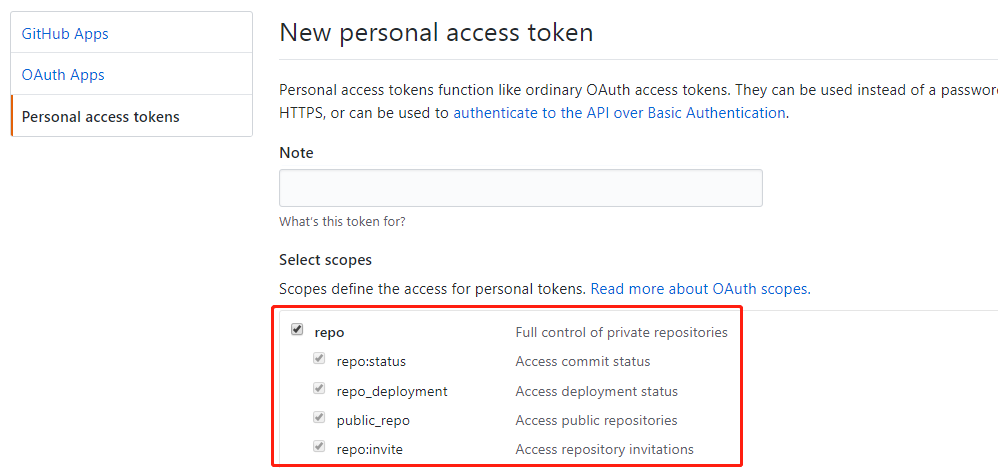
进入Travis CI关联Github账号,同步账号并激活blog repo。
进入blog的设置界面设置自动部署触发条件;并把刚刚生成的 GitHub Access Token 添加到环境变量
GITHUB_TOKEN里。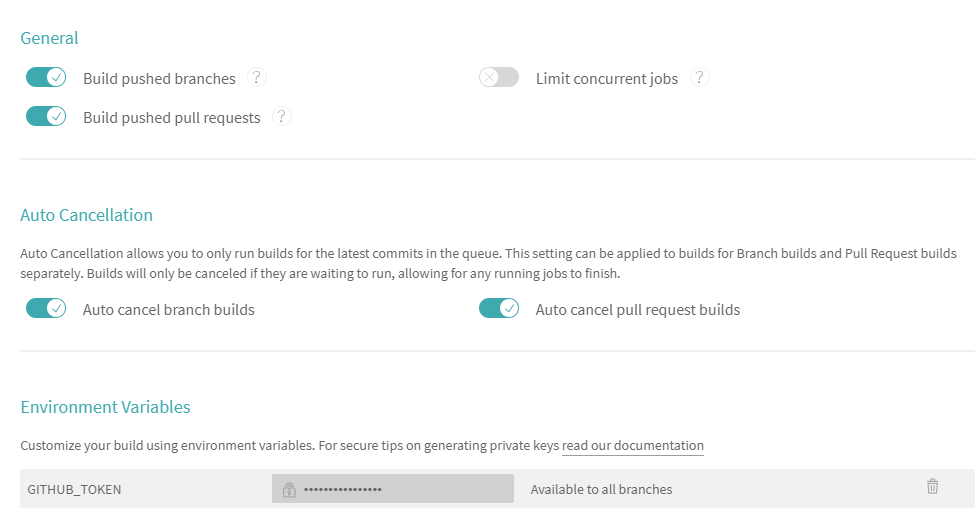
在blog 目录中添加触发部署文件
.travis.yml,当blog repo文件发生变化时触发该文件内容- 默认情况下,travis 会自动下载 git submodules
- github_token: $GITHUB_TOKEN 要和 travis 设置的环境变量名一致
sudo: false
language: go
git:
  depth: 1

go:
  - "1.8"

install:
  - wget https://github.com/gohugoio/hugo/releases/download/v0.62.2/hugo_0.62.2_Linux-64bit.deb
  - sudo dpkg -i hugo*.deb

# install: go get -v github.com/gohugoio/hugo
script:
  #运行HUGO命令
  - hugo -D
  - npm install
  - npm run algolia
after_script:
  # 部署
  - cd ./public
  - git init
  - git config user.name "<github_username>"
  - git config user.email "<github_email>"
  - git add .
  - git commit -m "Update Blog By TravisCI With Build $TRAVIS_BUILD_NUMBER"
  # Github Pages
  - git push --force --quiet "https://$GITHUB_TOKEN@${GH_REF}" master:master
  # Github Pages
  - git push --quiet "https://$GITHUB_TOKEN@${GH_REF}" master:master --tags
env:
 global:
   # Github Pages URL
   - GH_REF: github.com/<github_username>/<username>.github.io.git
deploy:
  provider: pages              # 重要,指定这是一份github pages的部署配置
  skip_cleanup: true           # 重要,不能省略
  local_dir: public            # 静态站点文件所在目录
  github_token: $GITHUB_TOKEN  # 重要,$GITHUB_TOKEN是变量,需要在GitHub上申请、再到配置到Travis
  keep-history: true           # 是否保持target-branch分支的提交记录
  on:
    branch: master           # 博客源码的分支
  repo: <username>/<username>.github.io
# fqdn:                       # 如果是自定义域名,此处要填
  target_branch: master         # 要将静态站点文件发布到哪个分支
  email: <github_email>
  name: <github_username>
添加
.gitignore文件在 Hugo 本地编译时会产生
public文件夹,但是这个文件夹中的内容对于blog repo来说是不需要的 (包括用来存放主题的themes文件夹和主题产生的resources文件夹也是不需要的)我们可以用一个
.gitignore文件来排除这些内容在blog目录下创建并修改.gitignore,然后提交到github仓库
public/*
themes/*
resources/*
发布博客:
将修改后的内容发布到blog仓库中,Travis CI会自动将生成的博客展示界面部署完成。
通过
https://<user_name>.github.io/访问博客git add -A git commint -m "initial all files" git remote add origin https://github.com/<username>/blog git push -u origin master
添加Gittalk
创建Github Application:
在Github上创建一个Github Application
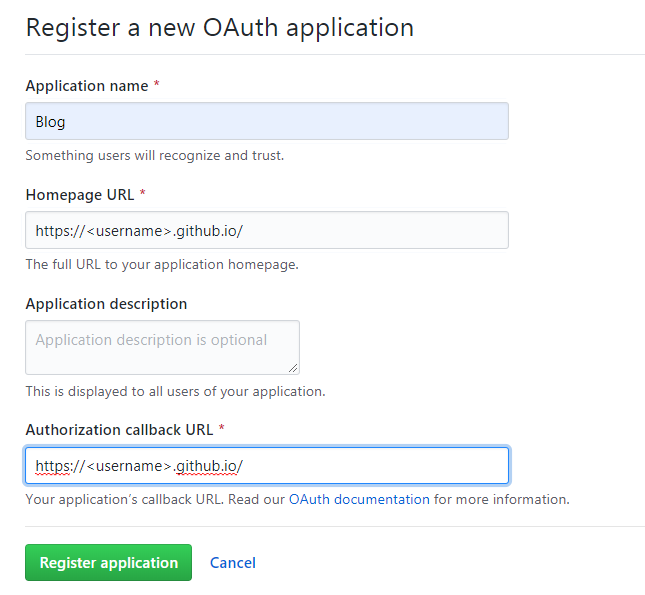
记录下ClientID和Client Secret,后面配置文件需要配置
配置config.toml文件:
[params.gitalk]
  clientID = "[Client ID]" # Your client ID`
  clientSecret = "[Client Secret]" # Your client secret`
  repo = "<username>.github.io" # The repo to store comments`

将 [Client ID] 替换为 Github Application 的 Client ID
将 [Client Secret]替换为 Github Application 的 Client Secret
将 repo 设置为你的博客的地址
具体配置参考gittalk官网