原文:Small Fire · Hugo添加搜索功能(Algolia) · 工具 子专栏 · Small Fire 技术笔记
Algolia:博客框架 https://www.algolia.com/
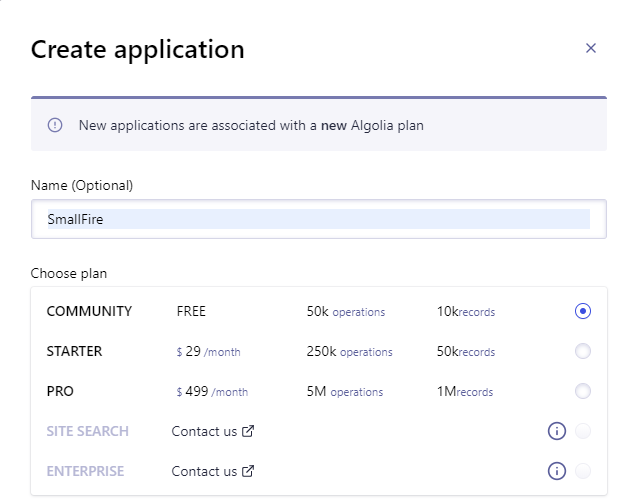
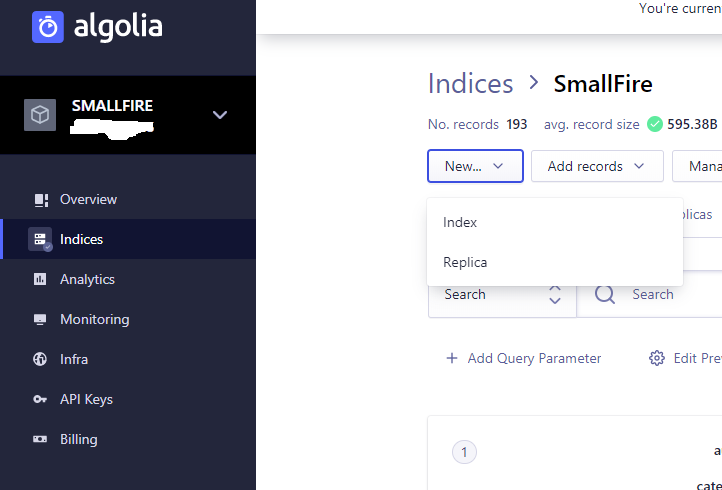
Algolia配置
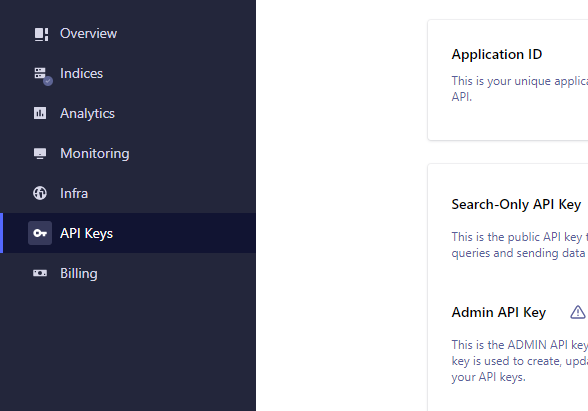
记录API Keys相关信息:
- Application ID
- Search-Only API Key
- Admin API Key
Hugo设置
- 在配置文件config中添加一下内容:
[outputFormats.Algolia]
  baseName = "algolia"
  isPlainText = true
  mediaType = "application/json"
  notAlternative = true

#vars 是 Hugo 内置变量; params 是自定义变量,按自己情况增减。
[params.algolia]
  vars = ["title","date", "publishdate", "expirydate", "permalink"]
  params = ["categories", "tags","series"]

[outputs]
  home = ["HTML","RSS","Algolia"]
2.在主题的根目录下 layouts/_default文件夹中新建 list.algolia.json 文件,文件内容如下
{{/* Generates a valid Algolia search index */}}
{{- $.Scratch.Add "index" slice -}}
{{- $section := $.Site.GetPage "section" .Section }}
{{- range .Site.AllPages -}}
{{- if or (and (.IsDescendant $section) (and (not .Draft) (not .Params.private))) $section.IsHome -}}
{{- $.Scratch.Add "index" (dict "objectID" .UniqueID "date" .Date.UTC.Unix "description" .Description "dir" .Dir "expirydate" .ExpiryDate.UTC.Unix "fuzzywordcount" .FuzzyWordCount "keywords" .Keywords "kind" .Kind "lang" .Lang "lastmod" .Lastmod.UTC.Unix "permalink" .Permalink "publishdate" .PublishDate "readingtime" .ReadingTime "relpermalink" .RelPermalink "summary" .Summary "title" .Title "type" .Type "url" .URL "weight" .Weight "wordcount" .WordCount "section" .Section "tags" .Params.Tags "categories" .Params.Categories "authors" .Params.Authors)}}
{{- end -}}
{{- end -}}
{{- $.Scratch.Get "index" | jsonify -}}
执行 hugo 命令之后,在 public 目录下产生 algolia.json 文件。
上传索引文件到Algolia
安装 atomic-algolia 包
npm init
npm install atomic-algolia --save
会在目录中产生package.json 文件和package-lock.json文件,修改文件scripts 内容
 "scripts": {
    "test": "echo \"Error: no test specified\" && exit 1",
    "algolia": "atomic-algolia"
  },
在创建的Blog本地项目中添加 .env文件
ALGOLIA_APP_ID=Application ID
ALGOLIA_ADMIN_KEY=Admin API Key
ALGOLIA_INDEX_NAME=Index_name
ALGOLIA_INDEX_FILE=public/algolia.json
上传索引文件:通过Travis-CI触发,需要添加脚本命令
npm run algolia
主题UI添加
在主题文件下的 layouts下创建文件夹search,文件夹内创建两个文件list.html,search.html.
list.html
{{ define "content" }}
<div id="main">
    <article class="post">

        <head>
            <div class="title">
                {{ if $.Scratch.Get "h1" }}
                <h1><a href="{{ .RelPermalink }}">{{ .Title }}</a></h1>
                {{ $.Scratch.Set "h1" false }} {{ else }}
                <h2><a href="{{ .RelPermalink }}">{{ .Title }}</a></h2>
                {{ end }} {{ with .Description }}
                <p>{{ . }}</p>
                {{ end }}
            </div>
        </head>
        <div id="content">{{ partial "search.html" . }}</div>
    </article>
    <!-- USE SIDEBAR -->
    <!-- Post Container -->
    <!-- <div class="
            col-lg-4 col-lg-offset-1
            col-md-4 col-md-offset-1
            col-sm-4
            col-xs-4
            post-container
        ">
        {{ partial "search.html" . }}
    </div> -->
</div>
{{ end }}
search.html
{{ define "content" }}
<script src="https://cdn.jsdelivr.net/npm/instantsearch.js@2.6.0"></script>
<script src="https://cdnjs.cloudflare.com/ajax/libs/moment.js/2.20.1/moment.min.js"></script>
<link rel="stylesheet" type="text/css" href="https://cdn.jsdelivr.net/npm/instantsearch.js@2.7.1/dist/instantsearch.min.css">
<link rel="stylesheet" type="text/css" href="https://cdn.jsdelivr.net/npm/instantsearch.js@2.7.1/dist/instantsearch-theme-algolia.min.css">
<div id="search-box">
    <!-- SearchBox widget will appear here -->
  </div>
  <!-- include algolia logo -->
 <!-- <img src="https://www.algolia.com/static/logo-algolia-nebula-blue-full-57c56ea4b99b30c8f2cc03b65e8bb849.png" style="float:right" width="80px"></img> -->
  <!-- <a href="https://www.algolia.com/" target="_blank"><img src="https://www.algolia.com/static/logo-algolia-nebula-blue-full-57c56ea4b99b30c8f2cc03b65e8bb849.png"></img></a> -->
  <div id="hits">
    <!-- Hits widget will appear here -->
  </div>
  <div id="pagination">
    <!-- Pagination widget will appear here -->
  </div>

<script>
//initialize instantsearch
const search = instantsearch({
  appId: '', //Add your info
  apiKey: '',//Add your info
  indexName: '',//Add your info
  urlSync: true
});

const hitTemplate = function(hit) {
/*  if (hit === null){
      return;
  }*/
  let date = '';
  if (hit.date) {
    date = moment.unix(hit.date).format('MMM D, YYYY');
  }
  let url = `${hit.url}#${hit.anchor}`;
  const title = hit._highlightResult.title.value;
  let breadcrumbs = '';
  if (hit._highlightResult.headings) {
    breadcrumbs = hit._highlightResult.headings.map(match => {
      return `<span class="post-breadcrumb">${match.value}</span>`
    }).join(' > ')
  }
  let content = "" ;
  if (hit._highlightResult.content){
      content = hit._highlightResult.content.value;
  }
  else{
      content = hit.summary;
  }
  return `
    <div class="post-item">
      <span class="post-meta">${date}</span>
      <h2><a class="post-link" href="${url}">${title}</a></h2>
      <a href="${url}" class="post-breadcrumbs">${breadcrumbs}</a>
      <div class="post-snippet">${content}</div>
    </div>
  `;
}
search.addWidget(
  instantsearch.widgets.searchBox({
    container: '#search-box',
    placeholder: 'Search into posts...',
    poweredBy: true // This is required if you're on the free Community plan
  })
);
search.addWidget(
  instantsearch.widgets.hits({
    container: '#hits',
    templates: {
      item: hitTemplate
    }
  })
);
search.start();
</script>

<style>
.ais-search-box {
  max-width: 100%;
  margin-bottom: 15px;
}
.post-item {
  margin-bottom: 30px;
}
.post-link .ais-Highlight {
  color: #111;
  font-style: normal;
  text-decoration: underline;
}
.post-breadcrumbs {
  color: #424242;
  display: block;
}
.post-breadcrumb {
  font-size: 18px;
  color: #424242;
}
.post-breadcrumb .ais-Highlight {
  font-weight: bold;
  font-style: normal;
}
.post-snippet .ais-Highlight {
  color: #2a7ae2;
  font-style: normal;
  font-weight: bold;
}
.post-snippet img {
  display: none;
}
</style>

{{ end }}
在layouts\partials\header.html中引入search.html,显示搜索结果
<nav class="navbar">
<div class="container">
<div class="navbar-header header-logo">
<a href="{{ .Site.BaseURL }}">{{ .Site.Title }}</a>
</div>
<div class="menu navbar-right">
{{ $currentPage := . }}
{{ range .Site.Menus.main }}
<a class="menu-item{{if or ($currentPage.IsMenuCurrent "main" .) ($currentPage.HasMenuCurrent "main" .) }} active{{end}}" href="{{ .URL }}" title="{{ .Title }}">{{ .Name }}</a>
{{ end }}
<a href="javascript:void(0);" class="theme-switch"><i class="iconfont icon-sun"></i></a>
<a href="/search/" class="search"><i class="iconfont icon-t"></i></a>
</div>
</div>
</nav>
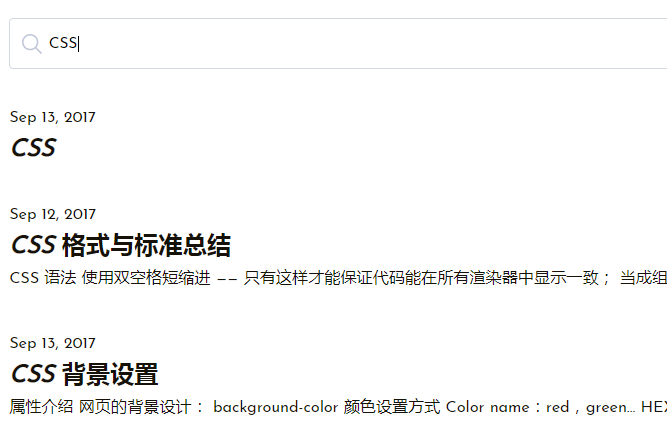
以上配置完成后即可在首页使用搜索功能。
参考文档: